Introducing Pi 1.0 for Rivet
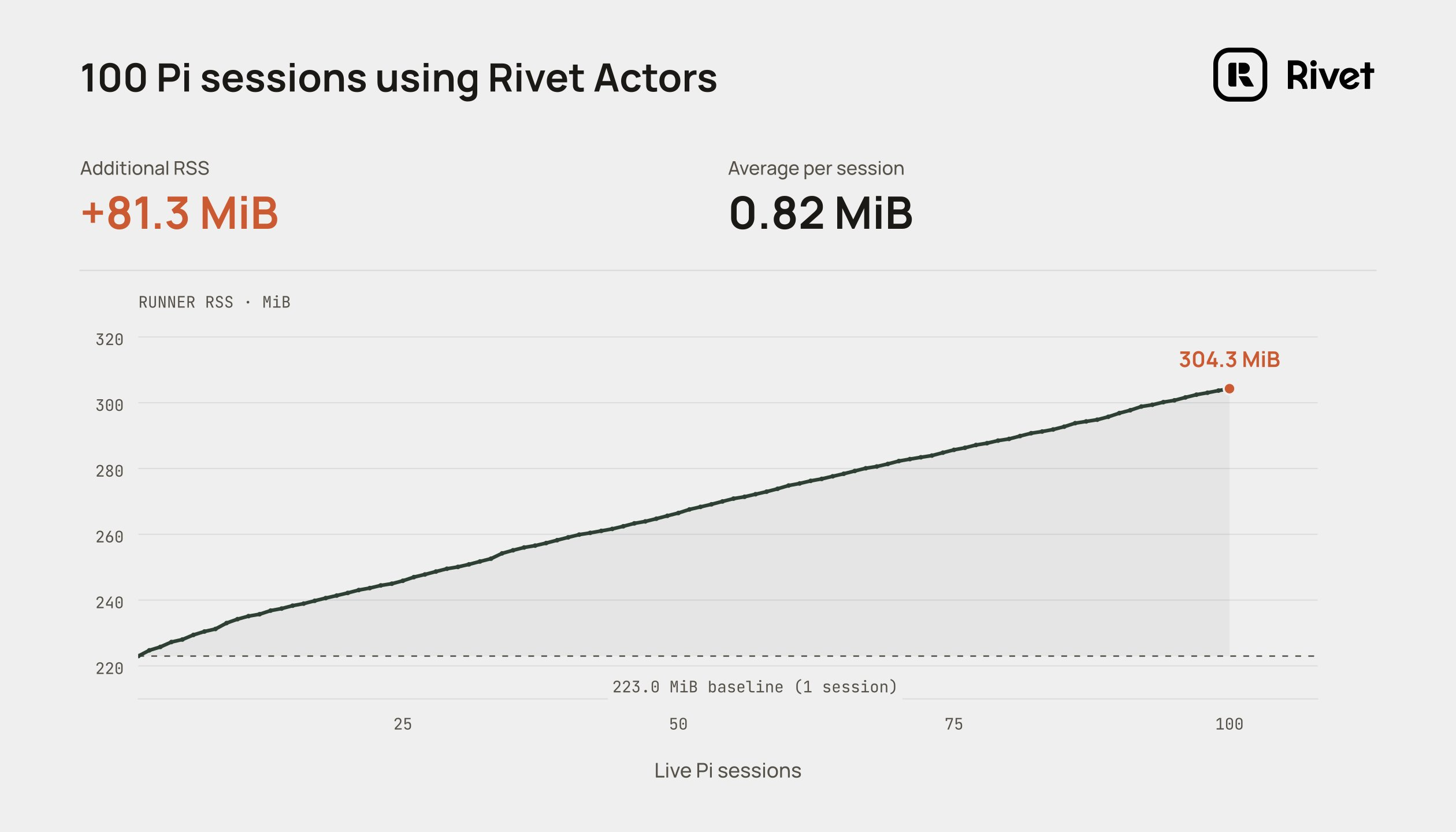
Run Pi 1.0 on Rivet Actors at 0.82 MB of RAM per session, with the harness in your backend and its tools in a separate sandbox.
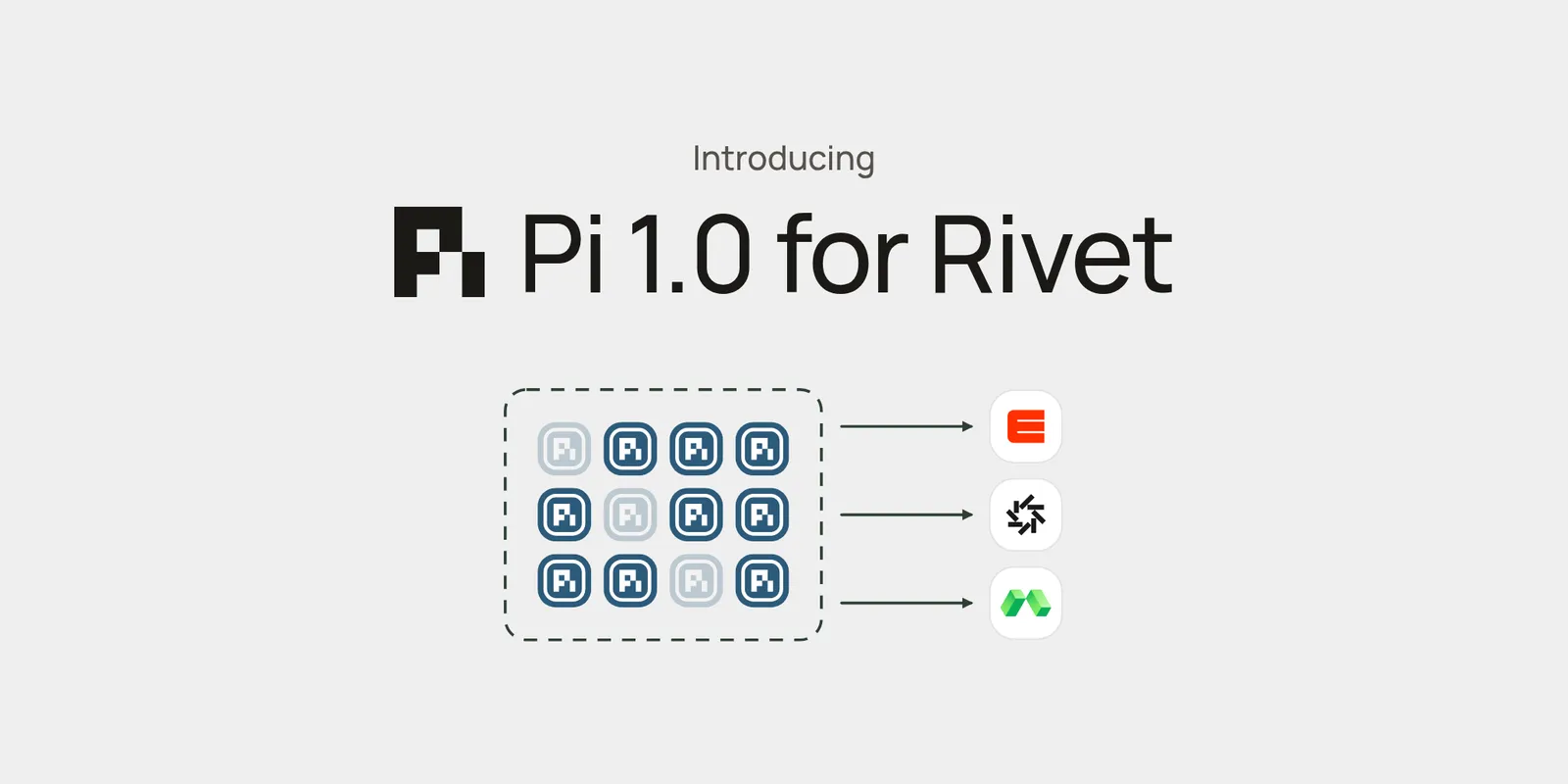
Today we’re introducing Pi Actors: run Pi 1.0 as an agent on Rivet. Each Pi session runs in its own Rivet Actor in your backend.
- 0.82 MB of RAM per session: run hundreds of Pi sessions in one process. Each one starts in tens of milliseconds and hibernates when idle.
- Harness separated from the sandbox: the agent loop, session, and credentials stay in your backend. Only tool calls reach the sandbox.
- Vanilla Pi, no wrapper: the official Pi package with raw access to its API, so every Pi update works on Rivet.
Use cases include:
- Background agents: the agent keeps working after the user closes the tab, and wakes itself on a schedule
- Multiplayer agents: many people watch, steer, and cancel the same session in realtime
- Email agents: one agent per inbox or thread, with the whole conversation remembered between replies
- Chat bots: answer mentions in Slack, GitHub, Linear, or Discord, with one session per thread
- Support agents: one agent per customer, with tools that call your own APIs
- Code review agents: a coding agent hands finished branches to a reviewer agent for that repository
0.82 MB per Pi session
Running the harness outside the sandbox is dirt cheap. In our benchmark, 100 live Pi sessions on one Rivet worker added 81.3 MiB on top of a 223 MiB baseline: 0.82 MiB per session.
When an agent runs in a sandbox, every session pays for an entire Node.js process: usually hundreds of MB of RAM and multiple seconds to start.
When the harness runs in your backend, hundreds of agents share one process. You pay the fixed cost of Node.js and its libraries once, and each new session is a few JavaScript objects in memory. Idle sessions hibernate and use no memory at all.
See the benchmark for the methodology and raw data.
Separate the harness from the sandbox
Running agents inside the sandbox is simple in theory, but in production the sandbox’s blast radius becomes your agent’s blast radius:
- Sandbox crashes or OOMs → the agent loop dies with it
- Disk fills up or the environment breaks → the agent is bricked
- Exposing your own API as tools → needs extra infrastructure
- Credentials can’t live in the sandbox → needs a whole credential proxy layer
- A sleeping sandbox can’t wake itself for crons
- Updating agent code → updating the binary in every VM
- Monitoring → the sandbox has to report its own failures
Rivet separates the harness from the sandbox instead:
- Run the harness in your backend
- Expose the sandbox as tools
- Keep credentials, history, and permissions outside
- Wake the sandbox only when needed
The agent doesn’t have access to the host it runs on. Its file and shell tools call into agentOS, E2B, Daytona, or your own provider on demand.
Amp, Vercel’s Eve, Cloudflare’s Flue, Claude Managed Agents, and OpenAI’s Agents SDK all use this architecture for a reason. Read Run Your Harness Outside the Sandbox for why and how.
Vanilla Pi, no wrapper
We believe the harness you run matters, and you should have full access to it: its opinionated APIs, its extensions, and everything else it ships. So Rivet runs the official Pi coding agent package with raw access to its API, not a fork, wrapper, or reimplementation:
- Pi’s session API: every session method is an Actor action, including
prompt,steer,followUp,abort,compact,setModel,setThinkingLevel, andnavigateTree - Pi’s events: every Pi event is streamed to clients unchanged
- Pi’s tools:
read,write,edit,grep,find,ls, andbash, running in your sandbox - Pi’s options: custom tools written with Pi’s
defineTool, resource loaders for system prompts andAGENTS.md, providers in Pi’smodels.jsonshape, thinking levels, and settings - Pi’s session: the full session tree, compaction, and retries, saved to the Actor’s SQLite database
When Pi ships updates and new features, you get them in Rivet.
Show me the code
Install Pi and the sandbox adapter:
npm add @rivet-dev/pi @rivet-dev/sandbox-adapter rivetkit
Define the agent with a sandbox provider. Set ANTHROPIC_API_KEY for the model:
E2B
npm add e2b
Set E2B_API_KEY.
import { pi } from "@rivet-dev/pi";
import { e2bProvider } from "@rivet-dev/sandbox-adapter/e2b";
import { setup } from "rivetkit";

const agent = pi({
	model: "anthropic/claude-opus-5-5",
	sandbox: e2bProvider({ template: "base" }),
});

export const registry = setup({ use: { agent } });

registry.start();
Daytona
npm add @daytonaio/sdk
Set DAYTONA_API_KEY.
import { pi } from "@rivet-dev/pi";
import { daytonaProvider } from "@rivet-dev/sandbox-adapter/daytona";
import { setup } from "rivetkit";

const agent = pi({
	model: "anthropic/claude-opus-5-5",
	sandbox: daytonaProvider(),
});

export const registry = setup({ use: { agent } });

registry.start();
Modal
npm add modal
Set MODAL_TOKEN_ID and MODAL_TOKEN_SECRET.
import { pi } from "@rivet-dev/pi";
import { modalProvider } from "@rivet-dev/sandbox-adapter/modal";
import { setup } from "rivetkit";

const agent = pi({
	model: "anthropic/claude-opus-5-5",
	sandbox: modalProvider(),
});

export const registry = setup({ use: { agent } });

registry.start();
agentOS
agentOS is hosted by Rivet, so there’s no SDK or key to add.
import { pi } from "@rivet-dev/pi";
import { agentOSProvider } from "@rivet-dev/sandbox-adapter/agentos";
import { setup } from "rivetkit";

const agent = pi({
	model: "anthropic/claude-opus-5-5",
	sandbox: agentOSProvider(),
});

export const registry = setup({ use: { agent } });

registry.start();
Connect, stream the reply, and send a prompt:
import { createClient } from "rivetkit/client";
import type { registry } from "./server";

const client = createClient<typeof registry>();
const conn = client.agent.getOrCreate(["support", "customer-123"]).connect();

conn.on("event", (event) => {
	if (event.type === "message_update" && event.assistantMessageEvent.type === "text_delta") {
		process.stdout.write(event.assistantMessageEvent.delta);
	}
});

await conn.prompt("Find the failing test and fix it.");
await conn.dispose();
Every key gets its own Actor, session, and sandbox. See the Quickstart to deploy it.
Features
Durability
The session is saved to the Actor’s SQLite database as it runs. Sleep, crashes, and deploys don’t lose the conversation, and the agent reconnects to the same sandbox when it wakes. See Architecture.
Realtime multiplayer
Every client connected to an agent receives the same events, and any of them can steer the run in progress:
import { createClient } from "rivetkit/client";
import type { registry } from "./server";

const client = createClient<typeof registry>();
const key = ["team", "incident-42"];

// Alice prompts the agent and streams its reply
const alice = client.agent.getOrCreate(key).connect();
alice.on("event", (event) => {
	if (event.type === "message_update" && event.assistantMessageEvent.type === "text_delta") {
		process.stdout.write(event.assistantMessageEvent.delta);
	}
});
const run = alice.prompt("Find out why the deploy failed.");

// Bob joins the same session and steers the run
const bob = client.agent.getOrCreate(key).connect();
await bob.steer("Check the staging logs first.");

await run;
See Session Lifecycle.
Agent-to-agent communication
Agents call each other directly through your backend, with no addresses or credentials in the sandbox. Here a coder hands finished branches to the reviewer for that repository and keeps working:
import { Type } from "@earendil-works/pi-ai";
import { defineTool } from "@earendil-works/pi-coding-agent";
import { pi } from "@rivet-dev/pi";
import { type Registry, setup } from "rivetkit";
import { createClient } from "rivetkit/client";

// The reviewer queues each request as a prompt, so reviews never collide
const reviewer = pi({
	model: "anthropic/claude-opus-5-5",
	actions: {
		requestReview: async (c, request: string) => {
			await c.schedule.after(0, "prompt", request, { streamingBehavior: "followUp" });
		},
	},
});

const client = createClient<Registry<{ reviewer: typeof reviewer }>>();

const requestReview = defineTool({
	name: "request_review",
	label: "Request review",
	description: "Send a finished branch to the repository's reviewer. Don't wait for the review.",
	parameters: Type.Object({ repo: Type.String(), branch: Type.String() }),
	async execute(_toolCallId, { repo, branch }) {
		await client.reviewer.getOrCreate([repo]).requestReview(`Review ${branch}`);
		return { content: [{ type: "text", text: `Sent ${branch} for review.` }], details: undefined };
	},
});

const coder = pi({ model: "anthropic/claude-opus-5-5", customTools: [requestReview] });

export const registry = setup({ use: { coder, reviewer } });

registry.start();
See Agent-to-Agent Messages and Subagents.
Custom tools
Custom tools run in your backend, so they can call your APIs with secrets the model and the sandbox never see:
import { Type } from "@earendil-works/pi-ai";
import { defineTool } from "@earendil-works/pi-coding-agent";
import { pi } from "@rivet-dev/pi";
import { setup } from "rivetkit";

const getOrder = defineTool({
	name: "get_order",
	label: "Get order",
	description: "Look up an order's status by its id.",
	parameters: Type.Object({ orderId: Type.String() }),
	async execute(_toolCallId, { orderId }, signal) {
		// ORDERS_API_TOKEN stays on your worker
		const res = await fetch(`https://api.example.com/orders/${orderId}`, {
			headers: { authorization: `Bearer ${process.env.ORDERS_API_TOKEN}` },
			signal,
		});
		const order = (await res.json()) as { status: string };
		return { content: [{ type: "text", text: `Status: ${order.status}` }], details: order };
	},
});

const agent = pi({ model: "anthropic/claude-opus-5-5", customTools: [getOrder] });

export const registry = setup({ use: { agent } });

registry.start();
See Custom Tools.
Per-agent databases
Give each agent its own SQLite database and expose it as tools. Here every agent session gets a notes Actor with its own database:
import { Type } from "@earendil-works/pi-ai";
import { defineTool } from "@earendil-works/pi-coding-agent";
import { pi } from "@rivet-dev/pi";
import { actor, type Registry, setup } from "rivetkit";
import { createClient } from "rivetkit/client";
import { db } from "rivetkit/db";

// One SQLite database per agent session
const notes = actor({
	db: db({
		onMigrate: async (db) => {
			await db.execute("CREATE TABLE IF NOT EXISTS notes (body TEXT)");
		},
	}),
	actions: {
		add: (c, body: string) => c.db.execute("INSERT INTO notes (body) VALUES (?)", body),
		search: (c, text: string) => c.db.execute("SELECT body FROM notes WHERE body LIKE ?", `%${text}%`),
	},
});

const client = createClient<Registry<{ notes: typeof notes }>>();

const saveNote = defineTool({
	name: "save_note",
	label: "Save note",
	description: "Save a note to your database.",
	parameters: Type.Object({ body: Type.String() }),
	async execute(_toolCallId, { body }, _signal, _onUpdate, ctx) {
		await client.notes.getOrCreate([ctx.sessionManager.getSessionId()]).add(body);
		return { content: [{ type: "text", text: "Saved." }], details: undefined };
	},
});

const searchNotes = defineTool({
	name: "search_notes",
	label: "Search notes",
	description: "Search the notes in your database.",
	parameters: Type.Object({ text: Type.String() }),
	async execute(_toolCallId, { text }, _signal, _onUpdate, ctx) {
		const rows = await client.notes.getOrCreate([ctx.sessionManager.getSessionId()]).search(text);
		const found = rows.map((row) => String(row.body)).join("\n");
		return { content: [{ type: "text", text: found || "No notes found." }], details: undefined };
	},
});

const agent = pi({ model: "anthropic/claude-opus-5-5", customTools: [saveNote, searchNotes] });

export const registry = setup({ use: { agent, notes } });

registry.start();
Schedules and workflows
Agents wake themselves on a schedule and sleep between runs, or run as steps in a durable workflow:
Schedules
import { pi } from "@rivet-dev/pi";
import { agentOSProvider } from "@rivet-dev/sandbox-adapter/agentos";
import { setup } from "rivetkit";

const agent = pi({
	model: "anthropic/claude-opus-5-5",
	sandbox: agentOSProvider(),
	onCreate: async (c) => {
		// Every morning at 9:00, prompt the agent
		await c.cron.set({
			name: "morning-triage",
			expression: "0 9 * * *",
			action: "prompt",
			args: ["Run the test suite and summarize any failures."],
		});
	},
});

export const registry = setup({ use: { agent } });

registry.start();
Workflows
import { pi } from "@rivet-dev/pi";
import { agentOSProvider } from "@rivet-dev/sandbox-adapter/agentos";
import { type Registry, setup, workflow } from "@rivet-dev/workflows";

const agent = pi({
	model: "anthropic/claude-opus-5-5",
	sandbox: agentOSProvider(),
});

type Agents = Registry<{ agent: typeof agent }>;

// Run the tests, wait ten minutes, then rerun them to find flaky tests
const flakyTest = workflow({
	state: { report: null as string | null },
	run: async (ctx) => {
		await ctx.step({
			name: "first-run",
			timeout: 10 * 60_000,
			run: async (step) => {
				const fixer = step.client<Agents>().agent.getOrCreate([step.actorId]);
				await fixer.abort();
				await fixer.prompt("Run the test suite and note any failing tests.");
			},
		});

		await ctx.sleep("wait-before-rerun", 10 * 60_000);

		await ctx.step({
			name: "second-run",
			timeout: 10 * 60_000,
			run: async (step) => {
				const fixer = step.client<Agents>().agent.getOrCreate([step.actorId]);
				await fixer.abort();
				await fixer.prompt("Run the suite again. Which failures happened both times?");
				step.state.report = (await fixer.getLastAssistantText()) ?? null;
			},
		});
	},
	actions: {
		getReport: (c) => c.state.report,
	},
});

export const registry = setup({ use: { agent, flakyTest } });

registry.start();
And more
- Optional sandboxes: run Pi without a sandbox for lightweight agents that only use your custom tools
- Swappable sandboxes: agentOS, E2B, Daytona, or your own provider
- Your users’ subscriptions: let users run agents on their own Claude or ChatGPT subscription, without the agent ever receiving a refresh token
- Tracing: each run is an OpenTelemetry span, without recording prompts, tool arguments, or tool results
- Human in the loop: make a tool wait for a person’s approval
- Scoped access: share a result through a link that reaches one Actor and expires
- React SDK: build a chat UI for an agent
- Connectors: Slack, GitHub, Linear, and Discord
- Open source: Apache 2.0, on Rivet Cloud or self-hosted
Pi Durable coming soon
Earendil also shipped Pi Durable alongside Pi 1.0, a new harness for long-running agentic applications. Pi Durable support is coming to Rivet in the coming days.