Quickstart
Start the server and send your first message.
Install skill (optional)
npx
npx skills add rivet-dev/skills -s sandbox-agent
bunx
bunx skills add rivet-dev/skills -s sandbox-agent
Set environment variables
Each coding agent requires API keys to connect to their respective LLM providers.
Local shell
export ANTHROPIC_API_KEY="sk-ant-..."
export OPENAI_API_KEY="sk-..."
E2B
import { Sandbox } from "@e2b/code-interpreter";

const envs: Record<string, string> = {};
if (process.env.ANTHROPIC_API_KEY) envs.ANTHROPIC_API_KEY = process.env.ANTHROPIC_API_KEY;
if (process.env.OPENAI_API_KEY) envs.OPENAI_API_KEY = process.env.OPENAI_API_KEY;

const sandbox = await Sandbox.create({ envs });
Daytona
import { Daytona } from "@daytonaio/sdk";

const envVars: Record<string, string> = {};
if (process.env.ANTHROPIC_API_KEY) envVars.ANTHROPIC_API_KEY = process.env.ANTHROPIC_API_KEY;
if (process.env.OPENAI_API_KEY) envVars.OPENAI_API_KEY = process.env.OPENAI_API_KEY;

const daytona = new Daytona();
const sandbox = await daytona.create({
  snapshot: "sandbox-agent-ready",
  envVars,
});
Docker
docker run -p 2468:2468 \
  -e ANTHROPIC_API_KEY="sk-ant-..." \
  -e OPENAI_API_KEY="sk-..." \
  rivetdev/sandbox-agent:0.4.3-full \
  server --no-token --host 0.0.0.0 --port 2468
Run the server
curl
Install and run the binary directly.
curl -fsSL https://releases.rivet.dev/sandbox-agent/0.4.x/install.sh | sh
sandbox-agent server --no-token --host 0.0.0.0 --port 2468
npx
Run without installing globally.
npx @sandbox-agent/cli@0.4.x server --no-token --host 0.0.0.0 --port 2468
bunx
Run without installing globally.
bunx @sandbox-agent/cli@0.4.x server --no-token --host 0.0.0.0 --port 2468
npm i -g
Install globally, then run.
npm install -g @sandbox-agent/cli@0.4.x
sandbox-agent server --no-token --host 0.0.0.0 --port 2468
bun add -g
Install globally, then run.
bun add -g @sandbox-agent/cli@0.4.x
# Allow Bun to run postinstall scripts for native binaries (required for SandboxAgent.start()).
bun pm -g trust @sandbox-agent/cli-linux-x64 @sandbox-agent/cli-linux-arm64 @sandbox-agent/cli-darwin-arm64 @sandbox-agent/cli-darwin-x64 @sandbox-agent/cli-win32-x64
sandbox-agent server --no-token --host 0.0.0.0 --port 2468
Node.js (local)
For local development, use SandboxAgent.start() to spawn and manage the server as a subprocess.
npm install sandbox-agent@0.4.x
import { SandboxAgent } from "sandbox-agent";

const sdk = await SandboxAgent.start();
Bun (local)
For local development, use SandboxAgent.start() to spawn and manage the server as a subprocess.
bun add sandbox-agent@0.4.x
# Allow Bun to run postinstall scripts for native binaries (required for SandboxAgent.start()).
bun pm trust @sandbox-agent/cli-linux-x64 @sandbox-agent/cli-linux-arm64 @sandbox-agent/cli-darwin-arm64 @sandbox-agent/cli-darwin-x64 @sandbox-agent/cli-win32-x64
import { SandboxAgent } from "sandbox-agent";

const sdk = await SandboxAgent.start();
Build from source
If you’re running from source instead of the installed CLI.
cargo run -p sandbox-agent -- server --no-token --host 0.0.0.0 --port 2468
Binding to 0.0.0.0 allows the server to accept connections from any network interface, which is required when running inside a sandbox where clients connect remotely.
Install agents (optional)
To preinstall agents:
sandbox-agent install-agent --all
If agents are not installed up front, they are lazily installed when creating a session.
Install desktop dependencies (optional, Linux only)
If you want to use /v1/desktop/*, install the desktop runtime packages first:
sandbox-agent install desktop --yes
Then use GET /v1/desktop/status or sdk.getDesktopStatus() to verify the runtime is ready before calling desktop screenshot or input APIs.
Create a session
import { SandboxAgent } from "sandbox-agent";

const sdk = await SandboxAgent.connect({
  baseUrl: "http://127.0.0.1:2468",
});

const session = await sdk.createSession({
  agent: "claude",
  sessionInit: {
    cwd: "/",
    mcpServers: [],
  },
});

console.log(session.id);
Send a message
const result = await session.prompt([
  { type: "text", text: "Summarize the repository and suggest next steps." },
]);

console.log(result.stopReason);
Read events
const off = session.onEvent((event) => {
  console.log(event.sender, event.payload);
});

const page = await sdk.getEvents({
  sessionId: session.id,
  limit: 50,
});

console.log(page.items.length);
off();
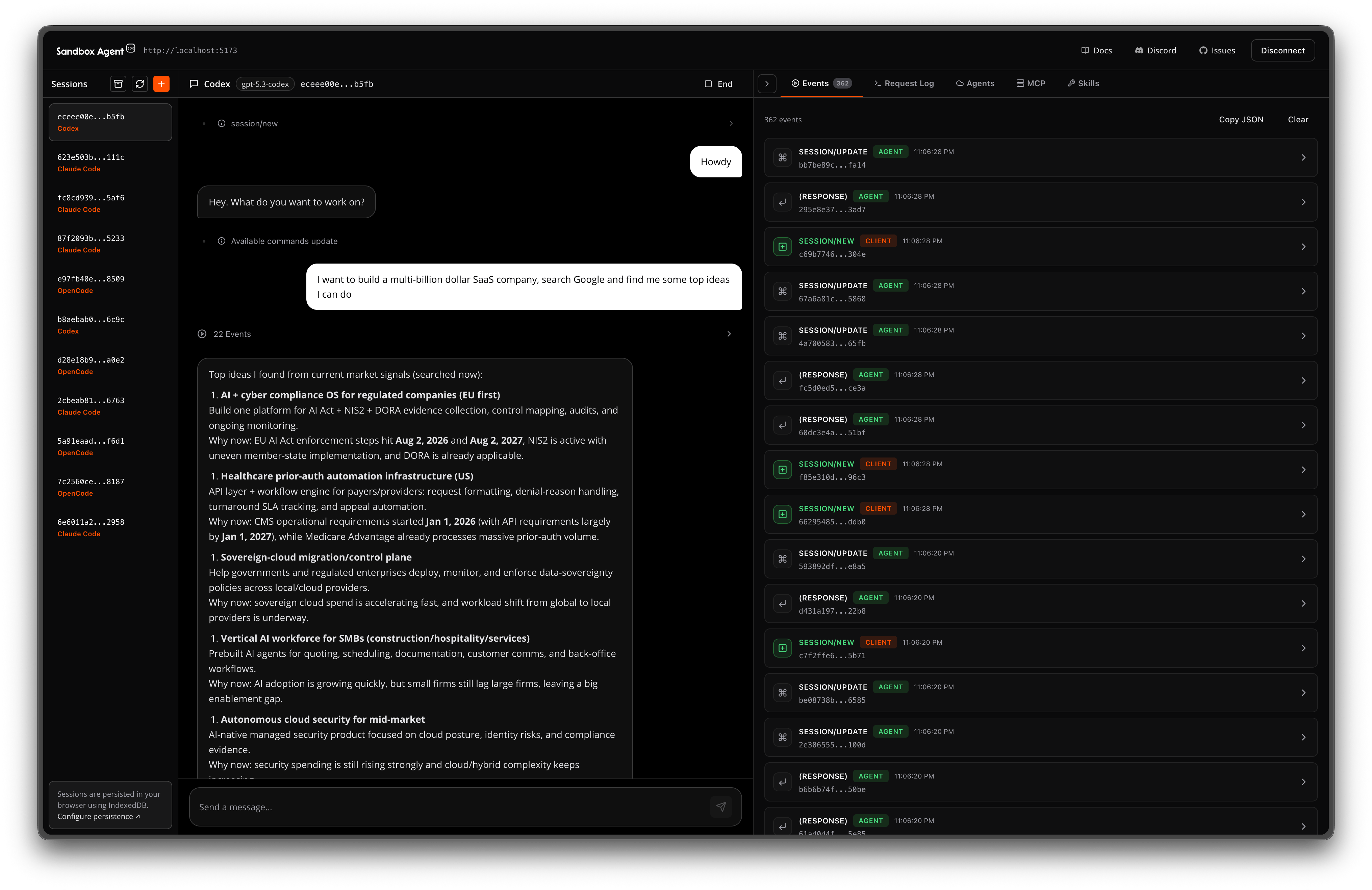
Test with Inspector
Open the Inspector UI at /ui/ on your server (for example, http://localhost:2468/ui/) to inspect sessions and events in a GUI.