Workers & Pools
Run Rivet workers as long-running processes or serverless functions, and group them into pools to route Actors to the right hardware.
A worker is a process that runs your Actor code. The Rivet control plane decides which worker each Actor runs on; the worker loads the Actor, runs its handlers, and reports back. Workers are grouped into pools, and every pool belongs to a namespace.
Workers attach to the control plane in one of two ways:
- Long-running: The default. Your process connects out to the control plane and stays connected, ready to run Actors. Used for local development and for containers, VMs, and bare metal.
- Serverless: The control plane calls your HTTP endpoint when it needs an Actor to run. Used for Vercel, Cloudflare Workers, and other request-driven platforms.
Long-Running Workers
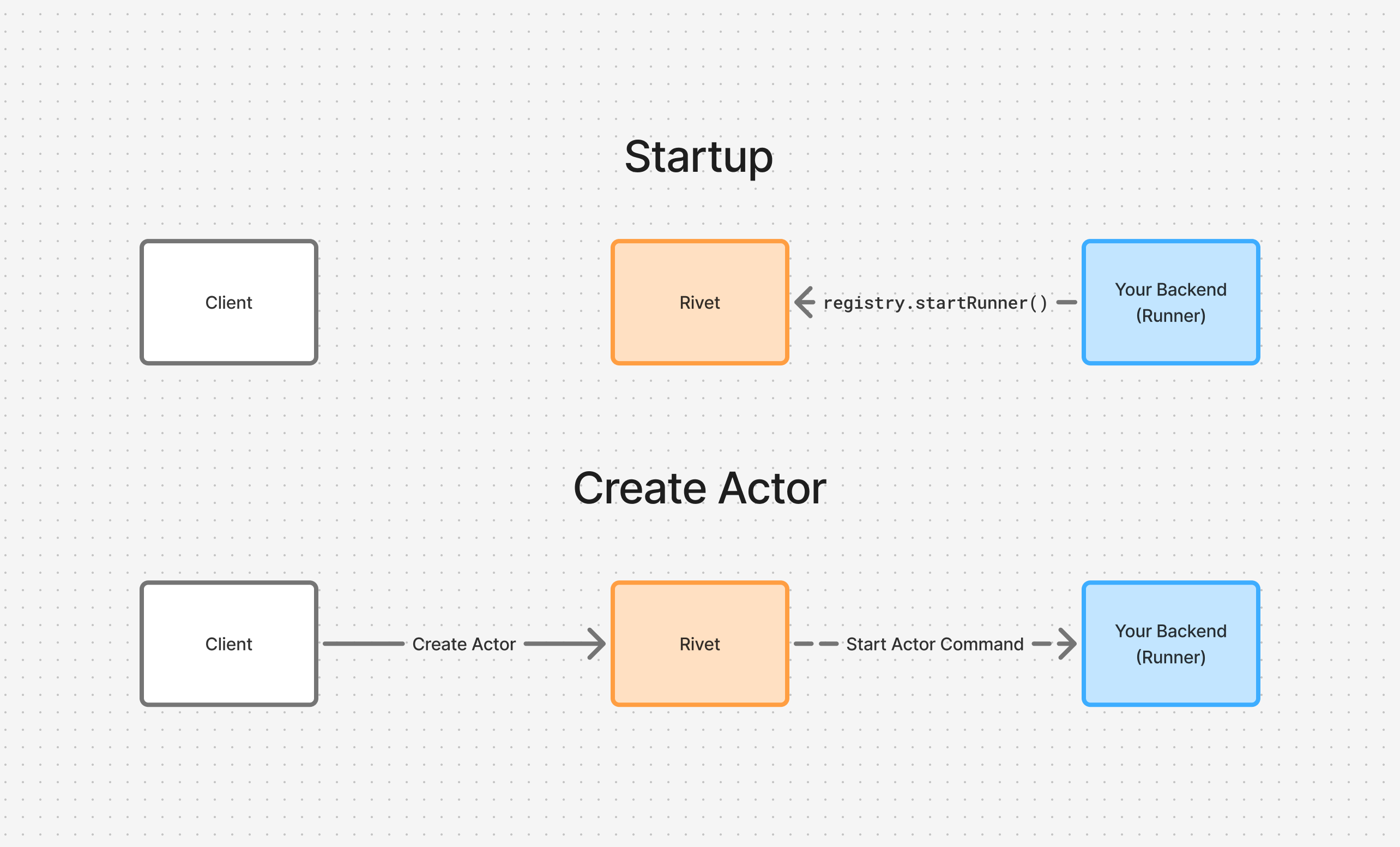
Call registry.startEnvoy() to open a persistent connection to the control plane. registry.start() does the same by default, and it is what runs when RIVETKIT_RUNTIME_MODE is unset, so local development and most deployments need no extra configuration.
import { actor, setup } from "rivetkit";

const myActor = actor({ state: {}, actions: {} });
const registry = setup({ use: { myActor } });

registry.startEnvoy();
When a client creates an Actor, the control plane sends a start command down this connection and the worker begins running the Actor.
Long-running workers fit when:
- You control the process: Railway, Hetzner, Kubernetes, AWS ECS, or any host that keeps a process alive.
- You have no public endpoint: The worker connects out, so it does not need to be reachable from the internet.
- You want to scale yourself: You decide how many worker processes run and where.
See Deploy Workers for platform-specific setup.
Serverless Workers
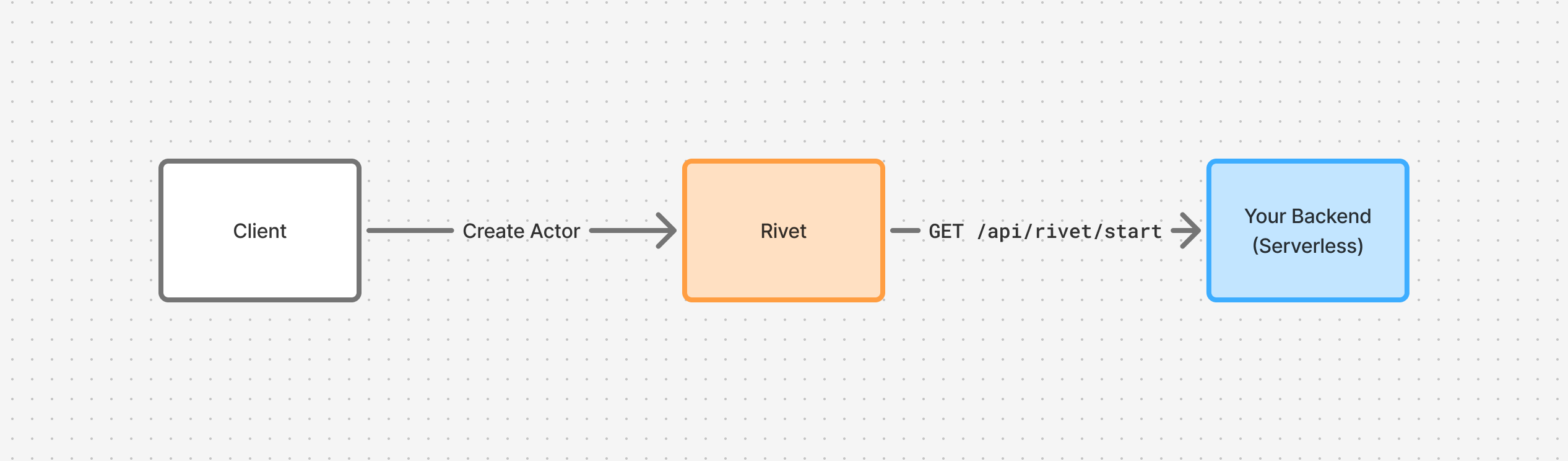
In serverless mode the control plane drives your backend over HTTP instead of the other way around. Set RIVETKIT_RUNTIME_MODE=serverless and expose the registry as a fetch handler:
import { actor, setup } from "rivetkit";

const myActor = actor({ state: {}, actions: {} });
const registry = setup({ use: { myActor } });

export default registry.serve();
Rivet Cloud sets RIVETKIT_RUNTIME_MODE=serverless for you on deploy. See Server Setup for routing options.
When a client creates an Actor, the control plane calls GET /api/rivet/start on your deployment, and that request stays open while the Actor runs.
Serverless workers fit when:
- Your platform is request-driven: Vercel, Cloudflare Workers, Supabase Functions, Google Cloud Run.
- You want scale to zero: No cost when no Actors are running.
- You want preview deployments: Each preview URL becomes its own set of workers.
Endpoints
The control plane calls two routes on a serverless worker:
GET /api/rivet/metadata: Validates configuration and returns the public endpoint for clients.GET /api/rivet/start: Runs Actors for the duration of the request.
You never call these yourself. They are listed so the traffic in your platform’s logs makes sense. The worker checks that /api/rivet/start requests originate from the endpoint in RIVET_ENDPOINT, so always set it in serverless mode; otherwise any control plane could drive your backend.
Timeouts
Serverless platforms cap how long a request may run. Rivet migrates Actors between requests as those caps approach, preserving state through ctx.state, so you can write Actor code as if it runs forever. Read more about how we handle timeouts.
Shutdown Sequence
Each serverless request has a configurable lifespan (requestLifespan, default 60 minutes). Set it to match your platform’s function timeout, for example requestLifespan: 3600 for Vercel Pro.
As the request nears its lifespan, the control plane reserves a grace period (serverless_drain_grace_period, default 10 seconds) to stop Actors cleanly. With a 3600-second lifespan, Actors begin stopping at 3590 seconds. Once the full lifespan elapses, the connection is closed and any remaining Actors are rescheduled. See Limits for configuration details.
Pools
A pool is the set of workers registered under one name within a namespace. Every namespace starts with a pool called default, and that is where workers land unless you say otherwise.
Use additional pools to route Actors to specific hardware or regions. A long-running worker joins a pool through RIVET_POOL or its config:
RIVET_POOL=gpu-workers
import { actor, setup } from "rivetkit";

const myActor = actor({ state: {}, actions: {} });

const registry = setup({
  use: { myActor },
  envoy: {
    poolName: "gpu-workers",
  },
});
A client then names that pool when it creates an Actor, and the control plane schedules the Actor onto a worker in it.
Pools come in two kinds that match how their workers attach. A normal pool holds long-running workers that connect themselves. A serverless pool holds a URL the control plane calls to wake workers. Scaling limits, drain behavior on version upgrades, and eviction rate limits are all set per pool. See Pool Configuration.
Comparison
| Method | Mode | Use Case |
|---|---|---|
registry.startEnvoy() | Long-running | Default. Connects out to the control plane; no HTTP endpoint needed. |
registry.start() | Auto | Long-running by default. Binds an HTTP listener and serves static files when RIVETKIT_RUNTIME_MODE=serverless. |
registry.serve() | Serverless | Fetch handler for serverless platforms. |
registry.handler() | Serverless | Mounts into an existing router such as Hono or Elysia. |
Related
- Versions & Upgrades: Rolling out new worker versions without downtime.
- Pool Configuration: Scaling, drain, and eviction settings per pool.
- Deploy Workers: Platform guides for running workers.