Durable Streams now supports Rivet Actors
Real-time Durable Streams on open-source, self-hostable infrastructure, powered by Rivet Actors.
Today, Durable Streams is officially supported on Rivet.
Rivet builds composable infrastructure on open standards: SQLite for state, HTTP and WebSockets for transport, any cloud for hosting. Durable Streams is the next one.
Durable Streams for Rivet are powered by Rivet Actors, which means distributed, real-time streams on open-source, self-hostable infrastructure. More on how that works below.
Why now
The Electric team has been pioneering Durable Streams, and shipped a hosted solution for them called Electric Streams.
Now that the team has joined Databricks (congratulations!), Electric Cloud is winding down on September 10.
Rivet is providing a graceful path to move your Electric Streams over to open-source infrastructure that runs where you need it to run.
Your existing Durable Streams client code works unchanged. Point it at a new URL and you’re migrated.
What are Durable Streams?
Durable Streams are a standard for real-time data streaming with durable history.
You write data to a stream, and readers can read from any index in the stream: catch up from the beginning, resume from where they left off, or tail it live.
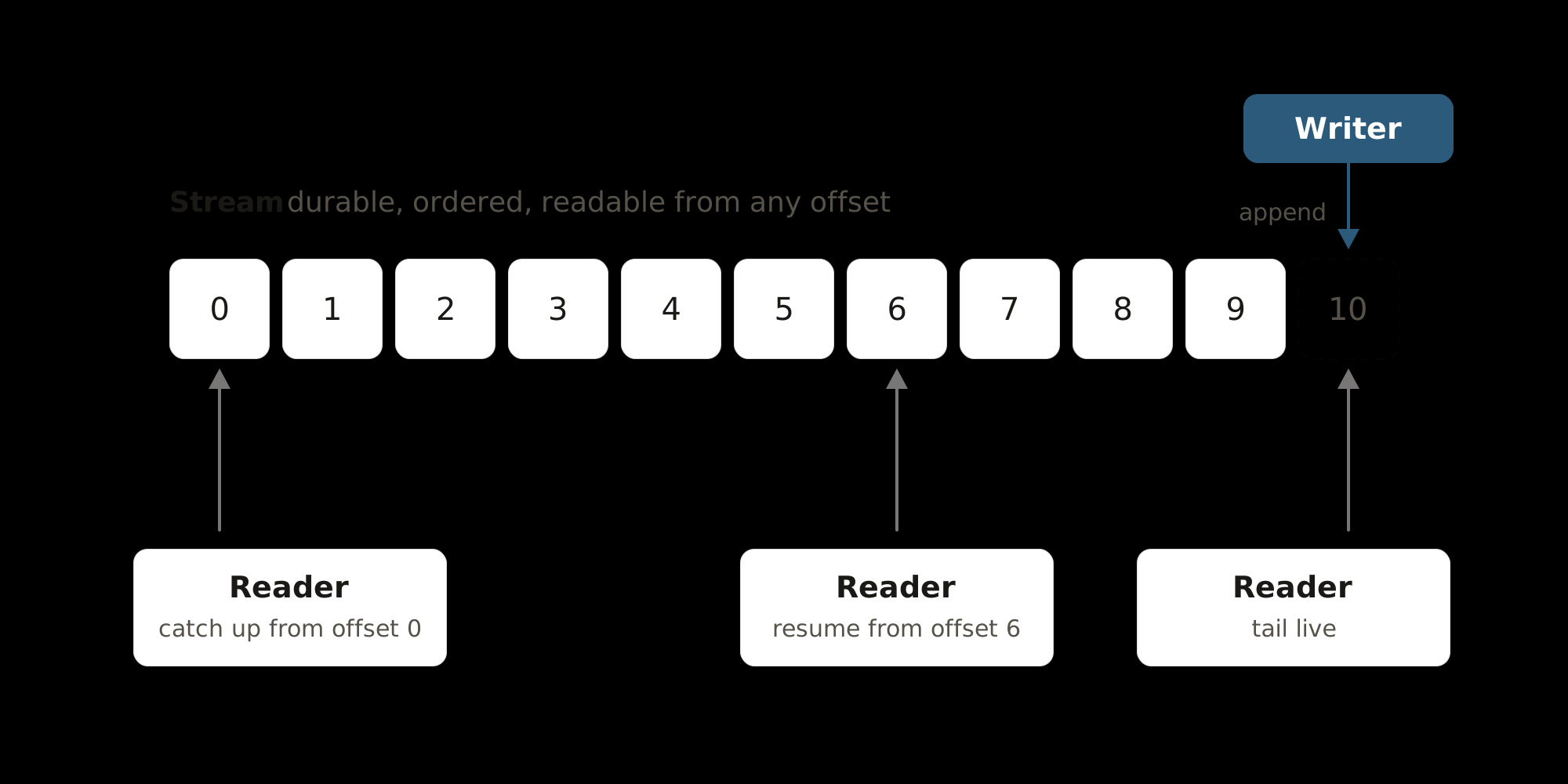
This is useful for use cases like:
- Agent sessions: prompts and responses survive restarts, and clients reconnect without losing a token.
- CRDT sync: a durable, ordered log of updates for collaborative editing with Yjs and similar libraries.
- Database sync: stream changes to every client and replay from any offset.
Powered by Rivet Actors for scale
Until now, Cloudflare Durable Objects were the only practical way to run Durable Streams. Rivet Actors give you a better option:
- Bottomless SQLite: unlimited Durable Streams storage. Streams aren’t capped at 10 GB like the Durable Objects backend, which is limited by Durable Objects’ SQLite size limit.
- SSD-backed with S3-tiered storage: hot reads and writes are served from local SSDs for low-millisecond operations, and history is tiered to S3 so storage is cheap, durable, and independent of any single machine. Read about how we built it.
- Multi-region edge network: streams run on Rivet’s edge network, so each stream lives in the region closest to the clients reading and writing it.
- Local development and production are exactly the same code: what runs on your laptop is what runs in production. No mocks and no emulators.
- Built in Rust: the Durable Streams server is native Rust for high-performance streams.
- Open-source and self-hostable: run it in your own VPC or on-prem, so your data stays with you and you’re not dependent on any other company.
Getting started with Durable Streams
Start the local development server
npx @rivet-dev/services dev
This starts a local Rivet Engine for you, so there’s nothing else to install. Your streams are at http://127.0.0.1:8642/durable-streams/v1/stream/.
If you’re running RivetKit with the TypeScript SDK, Durable Streams is already available at http://127.0.0.1:6420/durable-streams/v1/stream/.
Using the TypeScript SDK
npm install @durable-streams/client
import { DurableStream } from "@durable-streams/client";

const stream = await DurableStream.create({
	url: "http://127.0.0.1:8642/durable-streams/v1/stream/demo",
	contentType: "application/json",
});

await stream.append(JSON.stringify({ message: "hello" }));

const res = await stream.stream<{ message: string }>();
res.subscribeJson(async (batch) => {
	for (const item of batch.items) {
		console.log(item.message);
	}
});
Using HTTP
Create a stream, append a record, and read its contents:
# Create a stream with an initial record
curl -i -X PUT \
  -H 'content-type: application/json' \
  --data '[{"message":"hello"}]' \
  http://127.0.0.1:8642/durable-streams/v1/stream/demo

# Append to it
curl -i -X POST \
  -H 'content-type: application/json' \
  --data '{"message":"world"}' \
  http://127.0.0.1:8642/durable-streams/v1/stream/demo

# Read from the beginning
curl 'http://127.0.0.1:8642/durable-streams/v1/stream/demo?offset=-1'
Learn more about Durable Streams
See the Durable Streams documentation for the full protocol, JSON mode, StreamDB, and the Yjs, TanStack AI, and Vercel AI SDK integrations.
Inspecting your streams
Rivet ships a visual inspector for working with your streams. Browse every stream, read messages at any offset, and watch new records land live.
Deploying Durable Streams with Rivet
Durable Streams runs as a single service on Rivet Cloud or on your own Rivet Engine.
Rivet Cloud
Coming soon. Available September 4.
Create a project on Rivet Cloud
Sign up at the Rivet dashboard and create a new project.
Select Durable Streams as the product to run
When creating the project, choose Durable Streams as the product.
Point your client at it
Point your Durable Streams client at the services URL you’re given, for example https://xxxxx.rivet.run/durable-streams/.
Self-hosting
Run the Rivet control plane
Run the Rivet Engine with the required feature flags enabled:
docker run -p 6420:6420 \
  -e RIVET__FEATURES__GUARD_GATEWAY_V3__MODE=on \
  -e RIVET__FEATURES__GUARD_GATEWAY_V3__PERCENTAGE=100 \
  rivetdev/engine
See the self-hosting guides for other ways to run it.
Run the Durable Streams worker
The worker is what actually runs your streams. It connects to the control plane:
docker run -p 8642:8642 \
  --add-host=host.docker.internal:host-gateway \
  -e RIVET_ENDPOINT=http://host.docker.internal:6420 \
  -e HOST=0.0.0.0 \
  rivetdev/services
Point your client at it
Your streams are at http://<host>:8642/durable-streams/v1/stream/.
Integrating with an existing project
If you’re on Rivet Cloud, Durable Streams is already available to you. If you’re running Rivet locally, upgrade to Rivet 2.3.12. No other action needed.
Combining Durable Streams with Rivet Actors
Durable Streams are powered by Rivet Actors, but they also pair well with your own Rivet Actors.
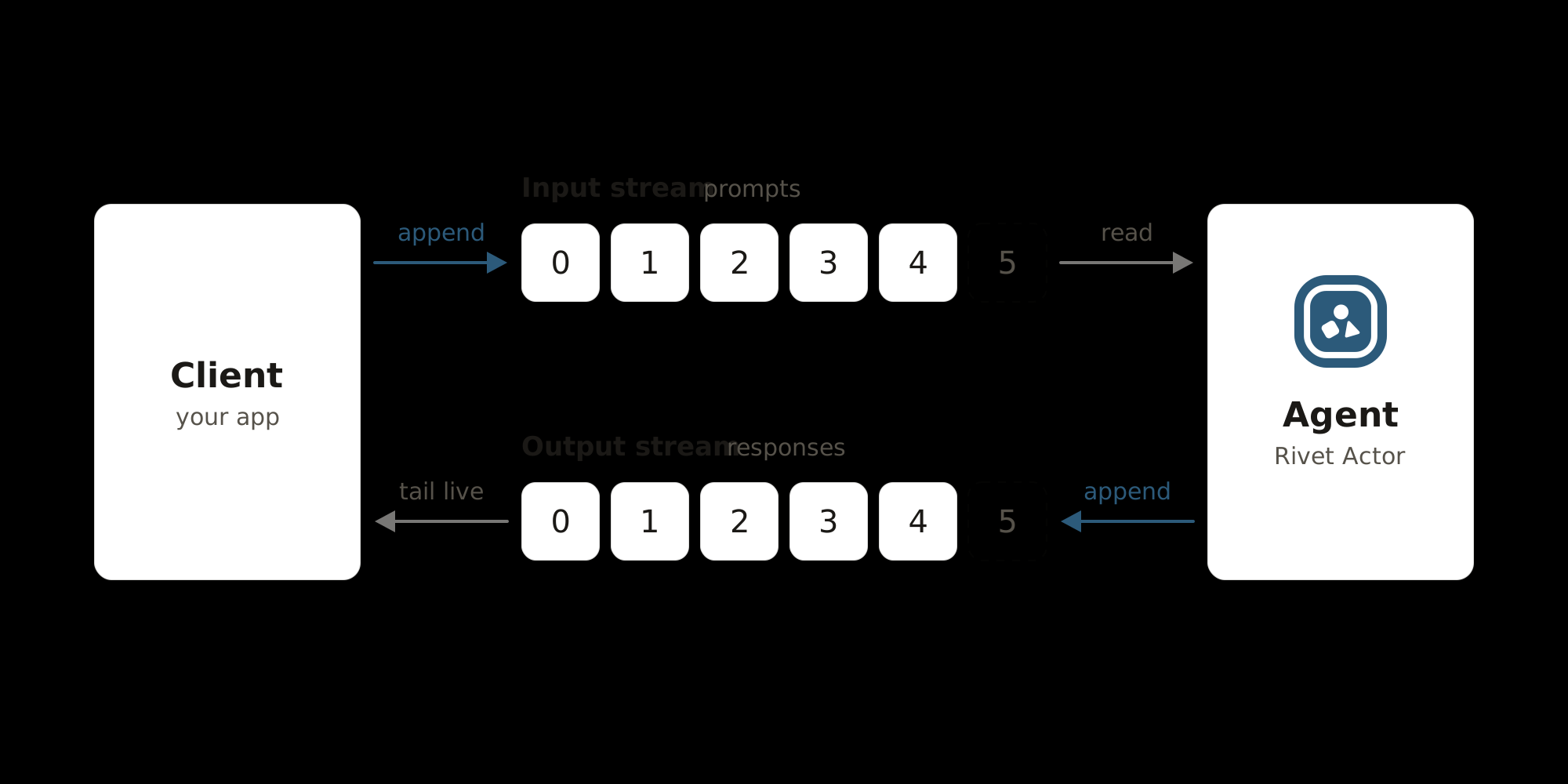
Here’s an example of an AI agent running as a Rivet Actor that uses two Durable Streams:
- Input stream: the agent reads prompts from it.
- Output stream: the agent runs each prompt through the Vercel AI SDK and appends the response to it.
import { anthropic } from "@ai-sdk/anthropic";
import { DurableStream } from "@durable-streams/client";
import { streamText } from "ai";
import { actor, setup } from "rivetkit";

const STREAMS_URL = "http://127.0.0.1:8642/durable-streams/v1/stream";

export const aiAgent = actor({
	createState: (_c, input: { conversationId: string }) => ({
		conversationId: input.conversationId,
		// Where the agent left off in the input stream
		inputOffset: undefined as string | undefined,
	}),

	onWake: async (c) => {
		const input = await DurableStream.create({
			url: `${STREAMS_URL}/${c.state.conversationId}/input`,
			contentType: "application/json",
		});
		const output = await DurableStream.create({
			url: `${STREAMS_URL}/${c.state.conversationId}/output`,
			contentType: "application/json",
		});

		// Tail the input stream, resuming from the saved offset
		for await (const chunk of input.read({
			offset: c.state.inputOffset,
			live: "long-poll",
			signal: c.abortSignal,
		})) {
			const prompt = JSON.parse(new TextDecoder().decode(chunk.data));

			// Stream the model's response into the output stream
			const result = streamText({
				model: anthropic("claude-sonnet-5"),
				prompt: prompt.text,
			});
			for await (const delta of result.textStream) {
				await output.append(JSON.stringify({ promptId: prompt.id, delta }));
			}
			await output.append(JSON.stringify({ promptId: prompt.id, done: true }));

			c.state.inputOffset = chunk.offset;
		}
	},
});

export const registry = setup({ use: { aiAgent } });
registry.start();
The client appends a prompt to the input stream and tails the output stream:
import { DurableStream } from "@durable-streams/client";

const STREAMS_URL = "http://127.0.0.1:8642/durable-streams/v1/stream";
const conversationId = "conversation-1";

// Push a prompt into the input stream
const input = await DurableStream.create({
	url: `${STREAMS_URL}/${conversationId}/input`,
	contentType: "application/json",
});
await input.append(JSON.stringify({ id: "prompt-1", text: "What is a durable stream?" }));
// If the agent went to sleep while idle, wake it here so it picks up the prompt

// Tail the response as it streams in
const output = await DurableStream.create({
	url: `${STREAMS_URL}/${conversationId}/output`,
	contentType: "application/json",
});
const res = await output.stream<{ delta?: string; done?: boolean }>();
res.subscribeJson(async (batch) => {
	for (const item of batch.items) {
		if (item.delta) process.stdout.write(item.delta);
	}
});
Because both streams are durable, the client can disconnect mid-response and catch up later, and the agent picks up where it left off if it restarts.