Building the World's Fastest Package Manager with agentOS
agentOS packages install in 130µs, here's how we did it.
We built agentOS as a lightweight alternative to sandboxes. Because it runs Linux on WebAssembly, it cold-starts up to 516× faster than a sandbox, and it’s light enough to run inside your own backend in userspace, with no external sandboxing infrastructure.
But once starts are that cheap, everything else on the setup path becomes the bottleneck, starting with installing packages. So today we introduced the agentOS Package Registry, which meant installing packages without the overhead you’d expect from apt, apk, Homebrew, and the rest.
The status quo for package managers
The best known package managers all do roughly the same thing on install.
Take apt, for example. Installing git means dpkg has to:
- Unpack the
.deband write its files onto the disk (/usr/bin/git,/usr/lib/git-core/,/usr/share/) - Record the install in its package database at
/var/lib/dpkg/ - Run the package’s post-install scripts
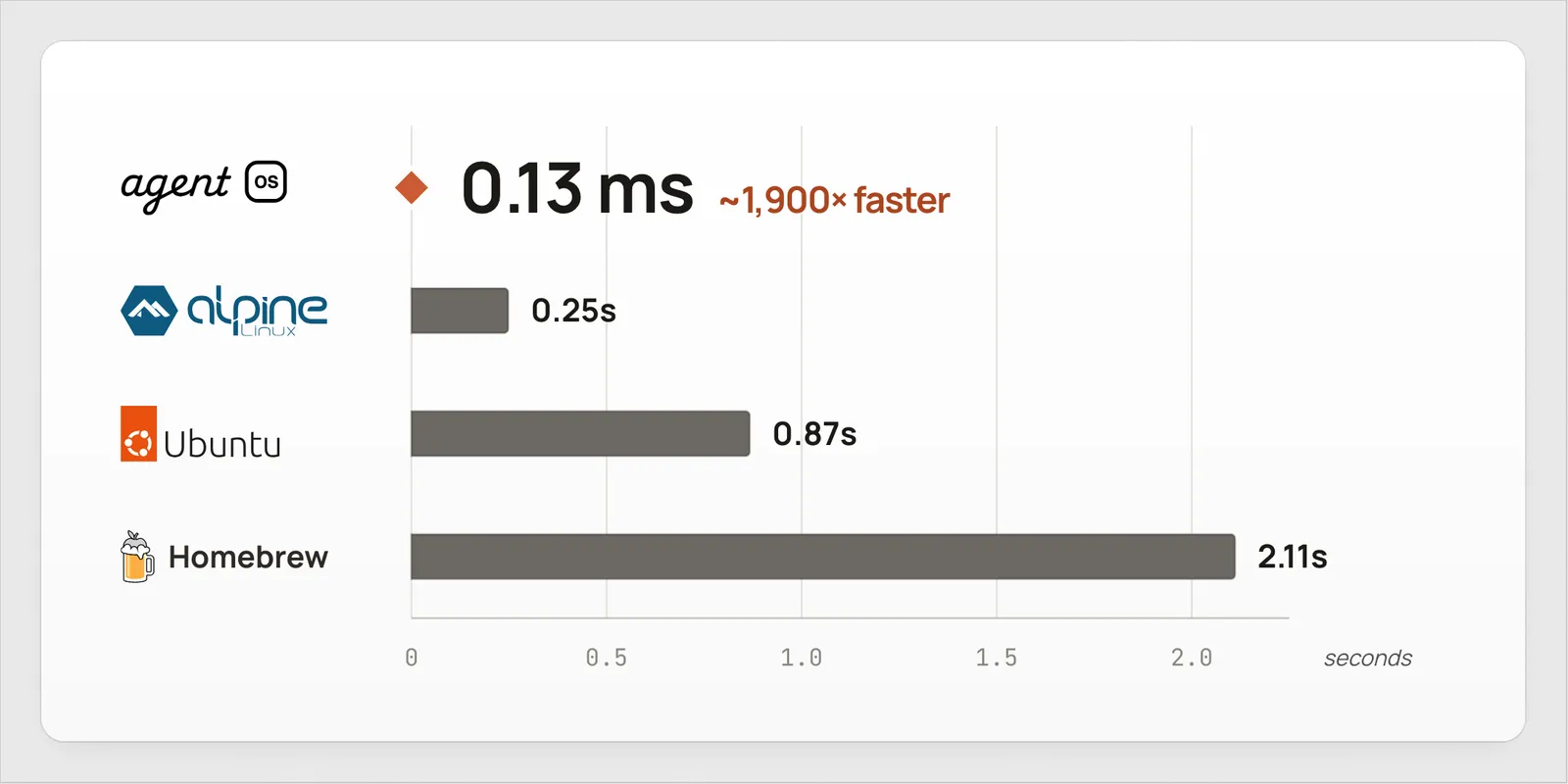
We benchmarked how long that actually takes. Installing git offline takes 0.25s on apk, 0.48s on pacman, 0.87s on apt, and 2.11s on Homebrew.
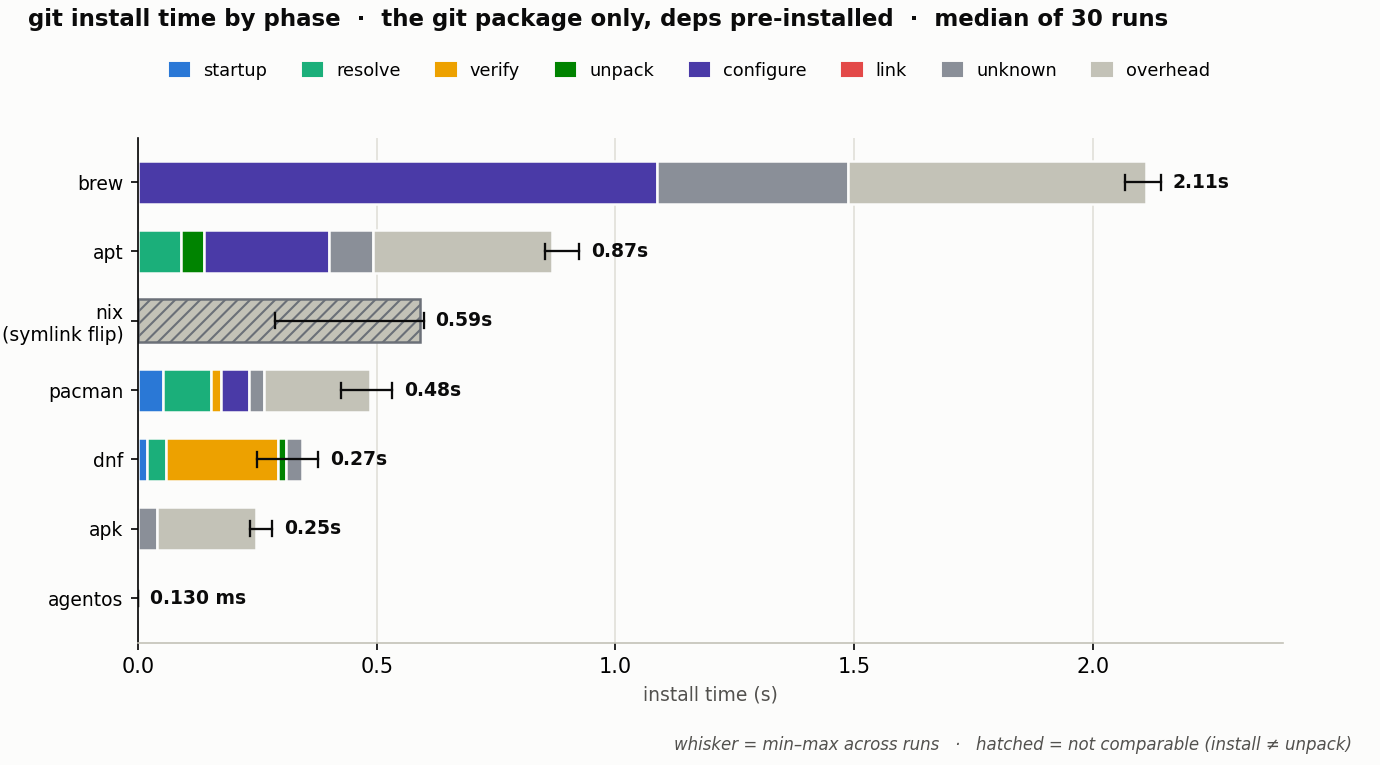
[Source]
For your dev machine, these times are fine.
But agentOS VMs need to start instantly, so running shell scripts and filesystem calls for every single package is unacceptable.
Fast installs with 0 filesystem writes
The premise behind agentOS’s package performance is that installing a package writes nothing to the filesystem and runs no scripts. There’s no extraction, no file copies, and no post-install step, so the install is effectively free.
Two things make this possible: a package format designed to be read in place, and a virtual filesystem that serves those reads without ever unpacking anything.
The agentOS Package Binary Format
First, a prerequisite. An agentOS package is nothing more than a single binary file, a .aospkg. It’s a deliberately simple container built to be read in place, with no unpacking step: a header, the package manifest, an index of where every file sits, and an uncompressed tar of the files themselves.
On startup, installing a package means agentOS reads the manifest and loads the index, and nothing else. The index already ships sorted by path, so it’s ready for binary-search lookups without any processing, and nothing is written to disk. The whole thing costs 130µs, effectively free.
Reading a file that was never written
So how do you run a package if it was never written to disk?
This is where agentOS’s powerful filesystem comes in. It supports flexible configurations for mounts, overlays, and virtual filesystems (the most relevant to this post).
A virtual filesystem (VFS) is a filesystem whose files don’t actually live on disk.
Instead, its filesystem operations (read, write, list, etc) map to arbitrary hooks in your code that return “virtual” files. Each read runs your hook, which returns whatever bytes it wants.
For example, a simple VFS could map a read of /hello/{name}.txt to Hello, {name}!, so reading /hello/world.txt returns Hello, world! without touching the disk.
The VFS behind agentOS packages
In the case of the agentOS package manager, it leverages VFS in order to completely remove the install phase from packages altogether. Instead, when the OS reads a package, it’s being served by a VFS.
Concretely, git’s files live under /opt/agentos/pkgs/git/<version>/. Reading one looks exactly like the /hello example above, only now the bytes come from the package itself:
With apt, installing git writes real files to /usr/bin, /usr/lib, and /usr/share, then runs post-install scripts. With agentOS, installing git writes nothing to disk. The file only appears when you read it, served on demand by the package VFS.
This means that you can setup an agentOS VM with packages preinstalled or install packages on the fly without any latency.
Reading a package that was never unpacked
But here’s the catch. We just said installing a package does zero filesystem writes. If that’s true, how do we take an archive downloaded from the internet and expose it as a real directory on the VM’s filesystem?
Say you have a .aospkg for something bigger, like a coding agent that bundles a whole Node app:
bin/
    agent
dist/
    index.js
node_modules/
    @modelcontextprotocol/sdk/
    zod/
    typescript/
    ...              # thousands of files
Most mainstream package managers extract an archive and write all the files to the host. Even if you have the package pre-downloaded, it requires expensive filesystem operations to actually turn that archive into a readable format on the host.
That means unpacking the .aospkg and writing every one of those files to disk, potentially thousands of tiny writes:
/opt/agentos/pkgs/agent/<version>/dist/index.js/opt/agentos/pkgs/agent/<version>/node_modules/zod/lib/index.js...and thousands more
agentOS takes a different approach:
Instead of extracting the tar and writing the files to the host, in agentOS the .tar is mounted directly as a filesystem.
This means that nothing needs to happen when you install a package, no matter how many files it has.
Reading a file works the same regardless of package size. When the user runs the agent:
- The OS reads
/opt/agentos/pkgs/agent/<version>/bin/agent. - agentOS returns the data directly from within the
.aospkgbinary file itself, without extracting to the filesystem.
This magic is made possible by a trick called mmap: it lets you map a portion of a file straight into memory.
Remember the index from the .aospkg format? It already records exactly where every file sits inside mount.tar. So to read ./bin/agent, agentOS can:
- Read the index to find what byte range of
mount.tarholdsbin/agent: offset1536, length4821. - mmap those
4821bytes at offset1536. - Return them to the OS.
This enables agentOS to take a software package and “install” it on the operating system with no tar extractions, no filesystem writes, and no scripts. Just a path to the .aospkg.
Why not snapshotting?
Most sandbox providers recommend working around this by:
- Provision a sandbox
- Install required packages (slow)
- Snapshot sandbox
- Create a new sandbox from that snapshot (faster)
- Repeat when you need to change packages
This is a similar strategy to using a Dockerfile to pre-install packages.
However, the nature of agents is they’re great at morphing their environment to their needs, including managing packages.
Snapshotting gives you a rigid base VM to work off of that requires an expensive & complicated operation to update.
agentOS Package Manager encourages composition, where packages can be installed cheaply without requiring a snapshot.
Putting it all together
When you put it all together, it provides a clean, simple way to install packages without overhead:
import { agentOS, setup } from "@rivet-dev/agentos";
import pi from "@agentos-software/pi";
import git from "@agentos-software/git";

// Each import is just a path to a package's .aospkg on disk.
console.log(pi.packagePath);
// => /app/node_modules/@agentos-software/pi/package.aospkg

// Listing packages here "installs" them with zero I/O.
const vm = agentOS({
  software: [pi, git],
});

export const registry = setup({ use: { vm } });
registry.start();