Introducing Actor Forking for SQLite
Rivet Actors can now be forked in 20 ms. A fork starts with the original Actor's state and SQLite database without copying any data, so it costs nothing until it writes something new.
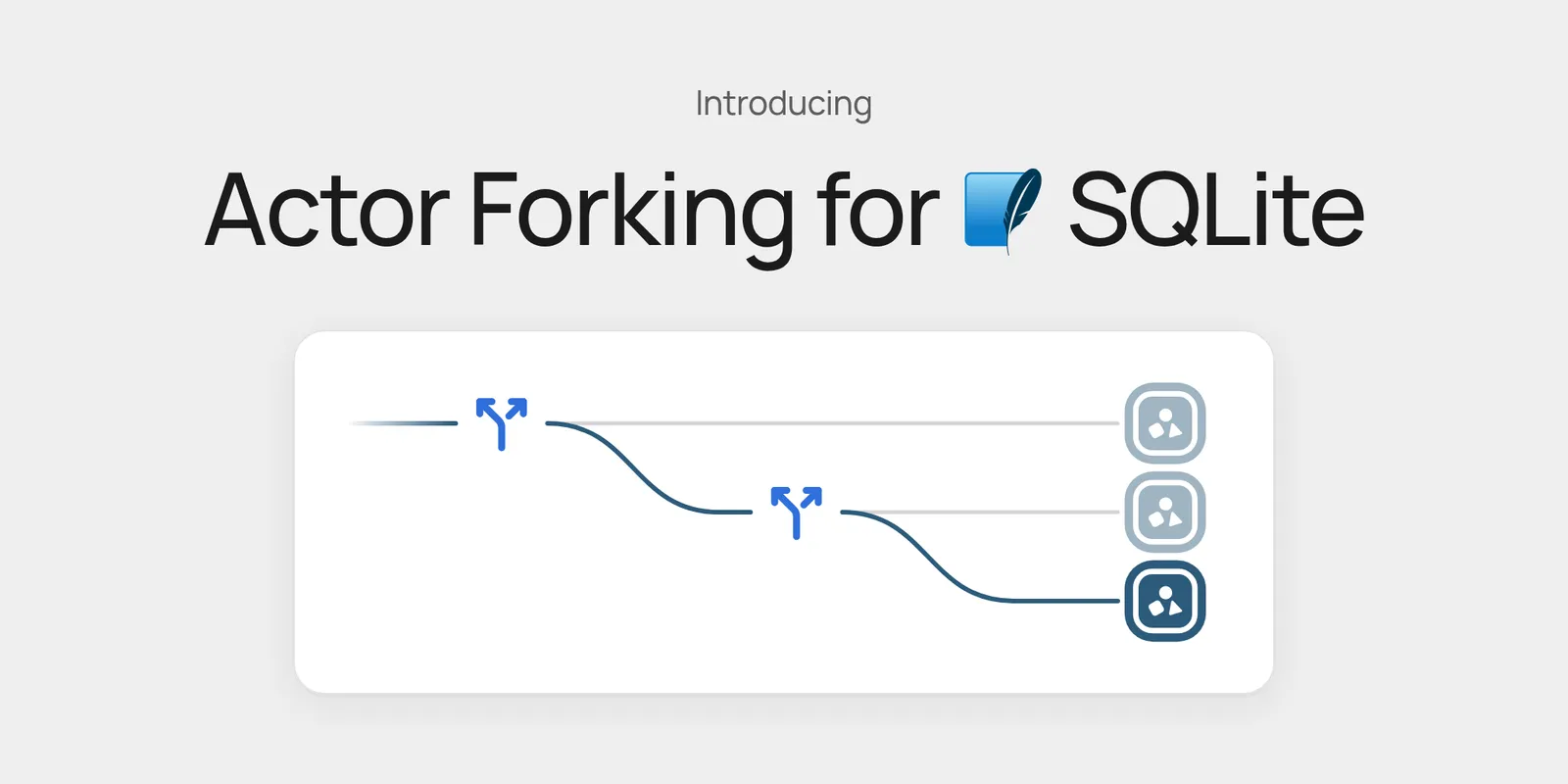
Rivet Actors can now be forked. A fork is a new Actor that starts with everything the original had, including its state and SQLite database, then goes its own way.
- Zero-copy: forks share the original’s data instead of copying it
- Fast: a fork takes 20 ms
- Bottomless storage, free to fork: whether an Actor holds 1 MB or hundreds of gigabytes, forking it costs nothing; you only pay for the new data the fork writes
- Independent: writes to a fork never touch the original, and writes to the original never show up in the fork
A simple example:
// Create a new agent
const agent = client.agent.getOrCreate("thread-1");
await agent.prompt("Plan a refactor of the billing module.");

// Fork the agent: its conversation, files, and database
const fork = await agent.fork("thread-1-retry");
await fork.prompt("Try a different approach.");
Why do we need Actor forking?
Agents and the apps they build constantly need a copy of something to try a change on. Common use cases include:
- Forking agent threads: branch a conversation to retry from an earlier point or try a different prompt, and keep the original
- Agent swarms: fork one agent into many that share the same context, let them try different approaches in parallel, and keep the best result
- Forking agentOS file systems: give each fork its own copy of a workspace, with the repo cloned and tools installed, ready instantly
- Forking user documents: duplicate a document, template, or project for a user without copying its contents
- Preview deployments for user databases: give each preview its own copy of a user’s database, so a migration or new feature runs against real data without touching production
What does zero-copy mean?
Zero-copy means you can fork a database without copying any of its data.
- Fast: creating a fork takes 20 ms, since no data is copied
- Cheap: you’re only billed for new data written to the fork, not for a copy of the original’s data
Calling .fork() creates a new Actor with a pointer to the parent Actor, which records where its data was forked from.
How much does a fork cost?
A fork is effectively free. The only cost is new data written to the fork, not the original data it was forked from.
Show Me The Code
Fork an agent
An agent that works on a GitHub issue. Each Actor runs one agent and stores its conversation in its own SQLite database:
import { pi } from "@rivet-dev/pi";
import { setup } from "rivetkit";

const agent = pi({
	model: "anthropic/claude-opus-5-5",
});

export const registry = setup({ use: { agent } });

registry.start();
Let the agent find the bug, then fork it to try a fix without touching the original:
import { createClient } from "rivetkit/client";
import type { registry } from "./server";

const client = createClient<typeof registry>();

// Create a new agent
const agent = client.agent.getOrCreate("issue-1234");
await agent.prompt("Read the codebase and find why the checkout test fails.");

// Fork the agent: the fork starts with everything the agent learned above
const fork = await agent.fork("issue-1234-fix");
await fork.prompt("Fix it.");
Create an agent swarm
Fork the same agent into a swarm where each fork tries a different fix in parallel:
import { createClient } from "rivetkit/client";
import type { registry } from "./server";

const client = createClient<typeof registry>();

// Create a new agent
const agent = client.agent.getOrCreate("issue-1234");
await agent.prompt("Read the codebase and find why the checkout test fails.");

// Fork a swarm in parallel: each fork starts with everything the agent learned above
const approaches = ["minimal-fix", "refactor", "test-first"];
await Promise.all(
	approaches.map(async (approach) => {
		const fork = await agent.fork(`issue-1234-${approach}`);
		const result = await fork.prompt(`Fix it. Approach: ${approach}.`);
		console.log(approach, result.status === "done" ? result.text : result.reason);
	}),
);
Fork a user document
A document that stores its title and body in the Actor’s SQLite database:
import { actor, setup } from "rivetkit";
import { db } from "rivetkit/db";

export const document = actor({
	db: db({
		onMigrate: async (db) => {
			await db.execute(`
				CREATE TABLE IF NOT EXISTS document (
					id INTEGER PRIMARY KEY CHECK (id = 1),
					title TEXT NOT NULL,
					body TEXT NOT NULL
				);
			`);
			await db.execute(
				"INSERT OR IGNORE INTO document VALUES (1, 'Untitled', '')",
			);
		},
	}),
	actions: {
		getTitle: async (c) => {
			const rows = (await c.db.execute("SELECT title FROM document WHERE id = 1")) as {
				title: string;
			}[];
			return rows[0].title;
		},
		setTitle: async (c, title: string) => {
			await c.db.execute("UPDATE document SET title = ? WHERE id = 1", title);
		},
		setBody: async (c, body: string) => {
			await c.db.execute("UPDATE document SET body = ? WHERE id = 1", body);
		},
	},
});

export const registry = setup({ use: { document } });

registry.start();
Duplicate the document. The copy shares the original’s data, so only the new title is stored:
import { createClient } from "rivetkit/client";
import type { registry } from "./server";

const client = createClient<typeof registry>();
const original = client.document.getOrCreate("doc-123");
await original.setTitle("Q4 Plan");

// Fork the document without copying its contents
const copy = await original.fork("doc-123-copy");
await copy.setTitle("Q4 Plan (Copy)");

console.log(await original.getTitle()); // "Q4 Plan"
console.log(await copy.getTitle()); // "Q4 Plan (Copy)"